
Logging in to Sweetsino takes a username and password, works the same on desktop and mobile browsers, and opens the full account - the CAD cashier, active bonuses, the game history and the VIP section. There is no app to install for Canadian players: the Log In button sits in the top-right corner of the site, and once you are signed in the single wallet keeps your balance in one place across slots and live tables.
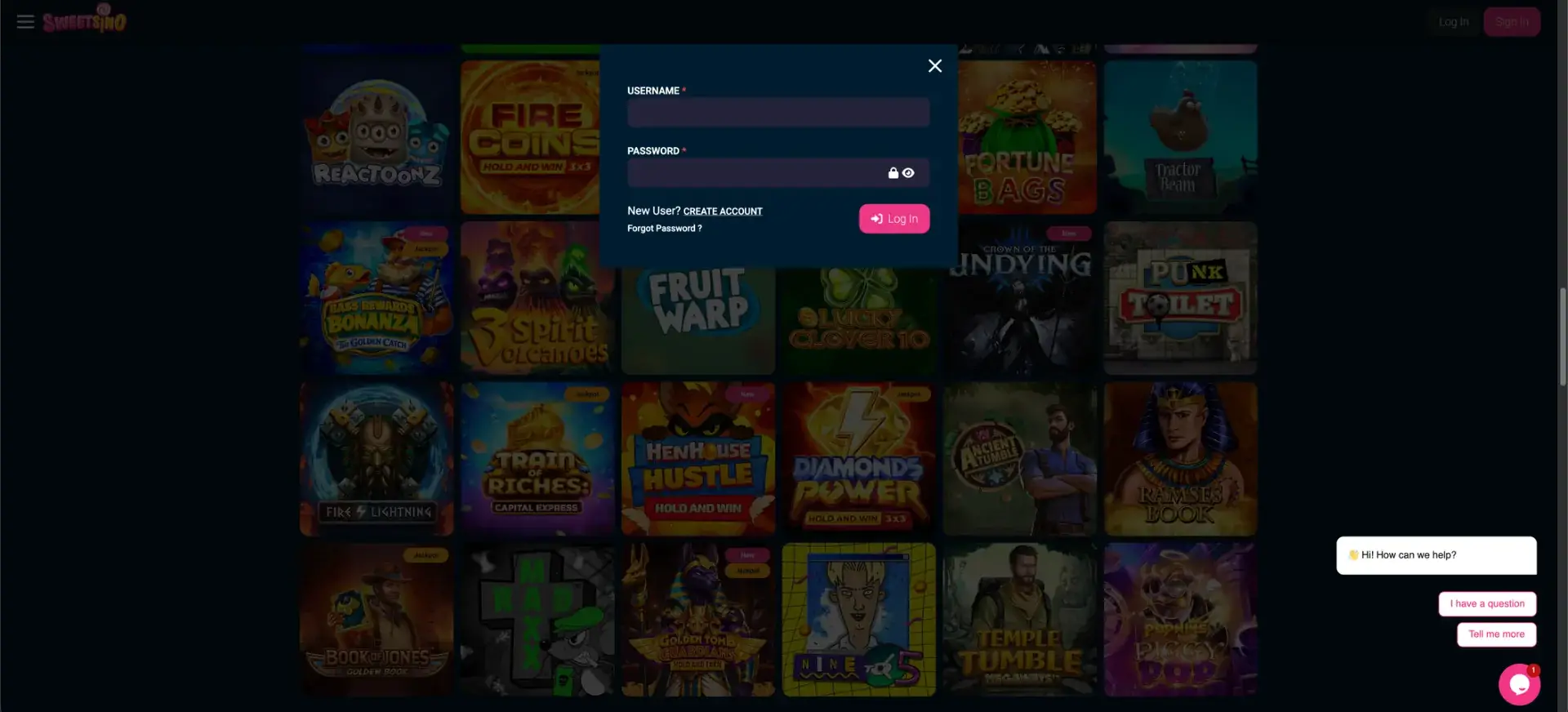
Access is protected by SSL encryption, a masked password field with a show/hide toggle, and identity verification (KYC) that applies when you request a withdrawal. This page sets out how to sign in, how to reset a password, how logging in works on mobile, and what to do if the login screen does not behave as expected.
| Login essentials | Details |
|---|---|
| Where to log in | Log In button, top-right of the site |
| Credentials | Username and password |
| Password field | Masked, with a show/hide toggle |
| Password reset | "Forgot Password?" link on the login window |
| Devices | Desktop and mobile browsers |
| Verification | KYC requested at withdrawal |
| Currency | CAD |
| Support | 24/7 live chat and email |
How to log in to Sweetsino
Signing in follows the same short path every time, whether you are on a laptop or a phone. Follow the steps below.
- Open the Sweetsino website in your browser.
- Click Log In in the top-right corner of the page.
- Enter the username you chose during registration.
- Type your password - use the eye icon to check it if needed.
- Click Log In and wait for the account to load without refreshing.
Creating an account first
If you do not have a profile yet, the login window links straight to registration, so you can open an account without leaving the page. The quick path is set out below.
- On the login window, click New User? Create Account.
- Complete step one - username, email, and a password you confirm twice.
- Add the additional details on step two and confirm on step three.
- Activate a welcome bonus in the cashier before your first deposit, or leave promotions off.
Secure login practices
A few habits keep a Sweetsino account safe, especially since the cashier and personal details sit behind the login. The main points are below.
- Use a long, unique password that you do not reuse on other sites.
- Keep your registered email secure, since password resets are sent there.
- Sign in only through the official Sweetsino site, not links from messages.
- Log out when using a shared or public device.
- Set responsible-play limits in your account once you are signed in.
Password recovery
If you cannot remember your password, there is no need to contact support first - the reset runs from the login window. Follow the steps below.
- Click Log In, then select Forgot Password?.
- Enter the email address linked to your Sweetsino account.
- Open the reset email and follow the link it contains.
- Set a new password, then return to the login window and sign in.
Mobile login
Because Sweetsino runs in the browser, mobile login is identical to desktop and does not need a separate app. A few tips make it smoother on a phone.
- Add Sweetsino to your home screen so it opens like an app.
- Use the show/hide toggle to confirm the password on a small keyboard.
- Keep the browser updated so the login form loads correctly.
Troubleshooting login problems
Most sign-in issues come down to a handful of causes, and each has a quick fix. The common ones are covered below.
Incorrect credentials
Double-check that the username and password are typed correctly, since the password field is case-sensitive. If you are unsure, use the show/hide toggle or run a password reset from the login window.
Browser or cache issues
If the login page loads but the form does not respond, the browser is often the cause. Clear the cache and cookies and reload, disable extensions that block scripts, or try a different browser.
Account not yet verified
You can log in before verification, but a withdrawal will prompt a KYC check. If a payout is held, open your account and complete verification so the request can be processed.
Account restricted
If the login is blocked, the account may be limited - for example, through a self-exclusion or a residency restriction. Contact live chat or email [email protected] to find out the reason and the next step.
What you access after login
Signing in unlocks the parts of Sweetsino that are tied to your profile rather than the public lobby. Once logged in, you can reach the following.
- The CAD cashier for deposits and withdrawals.
- Active bonuses and the option to switch promotions on or off.
- Your game and transaction history.
- Responsible-gambling tools - limits, reminders, breaks and self-exclusion.
- The VIP section for eligible players.
Account verification (KYC)
Verification is part of the withdrawal process, not the login itself, and reflects the casino's anti-money-laundering obligations. When it is requested, Sweetsino typically asks for proof of identity and address, and sometimes a payment-method confirmation, so it helps to have these ready before your first cashout.
Frequently asked questions
The most common questions about signing in to Sweetsino are answered below.
Where do I log in to Sweetsino?
Use the Log In button in the top-right corner of the Sweetsino website, on either desktop or mobile.
I forgot my password - what do I do?
Click "Forgot Password?" on the login window, enter your registered email, and follow the reset link that is sent to you.
Do I need an app to log in from Canada?
No. Sweetsino runs in the browser, so you log in through the website; you can add it to your home screen to open it like an app.
Why is my withdrawal on hold after I log in?
A withdrawal triggers a KYC check. Complete identity and address verification in your account so the payout can be processed.
Can I stay logged in on a shared device?
It is safer to log out on shared or public devices and to sign in only through the official Sweetsino site.